My main enhancement to WrappedCabCommand is the use of CAB's local service IActionCatalogService as main command executor and state controller. Here you can find a good description of this SCSF part. This service links named actions with methods, marked with [Action(ActionName)] attribute, registrers conditions - a code that controls action state (whether it can be executed or not),
and allows executing named action (invokes a pipe of subscribed methods).
Method marked with [Action(ActionName)] attribute should be public and match an ActionDelegate delegate signature. Subscribing process is controlled by ActionStrategy from SCSF, that is plugged into the ObjectBuilder strategy chain.
Action conditions are classes that implement IActionCondition interface. Their respective method is automatically invoked by IActionCatalogService before executing, or it could be invoked externally by a client code through the same IActionCatalogService service. The service builds an action pipeline, and results an integral decision of all IActionCondition classes registered for concrete action.
СAB Command.
Commands in CAB are a collection of Command objects stored in WorkItem and indexed by unique string identifier. CAB itself works with commands by means of CommandAdapter class, controling subscribers, command invokers etc. Commands are created by a CommandStrategy that is plugged in the ObjectBuilder strategies chain. Command is created when the strategy meets in created object public methods marked with [CommandHandler(CommandName)] attribute and matching the EventHandler delegate signature. CommandAdapter keeps internal invokers and subscribers tables for the named commands. And when it catches the specified event in invoker, WorkItem invokes all methods subscribed by means of [CommandHandler(CommandName)] attribute.
 Adding list view item as a ActivateOverview command invoker with Selected event
ActivateOverview command's subscriber method.
WPF Command.
In WPF commands are presented by classe implementing ICommand interface. There are 2 built-in command classes in WPF library - RoutedCommand and RoutedUICommand. They routes their CanExecute and Executed events in a visual-tree as it follows from their name. The built-in commands doesn't contains any predefined logic and simply allows to handle it by any object from VisualTree that is subbscribed to this command via CommandBinding. UI elements, that can be binded to a command, should implement ICommandSource interface. This interface contains the following properties: Command - the command itself (ICommand), CommandParameter - parameter being passed to the command handler (optional property) and CommandTarget - target - an object particular command will be executed on (optional property).
Come together!
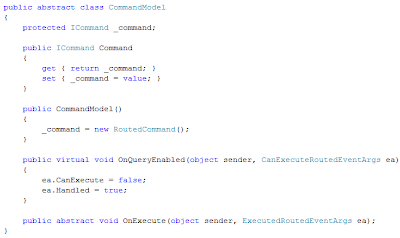
I've chosen a CommandModel class invented by Dan Crevier as a foundation for merged CAB and WPF commands entity.
 The ModuleCommand is the idea.
 ModuleCommand class interface. IActionCatalogService is injected by CAB's IoC-container while created.
This class finds a CAB command object by name - CommandName.
I've made a convention in unique command naming, it is identifies by the following way - CommandName identifies Command and IActionCatalog Service action, CommandName with prefixes Before[CommandName] and After[CommandName] identifies command-triggers being executed before and after actual command execution respectively.
WPF invokes the ModuleCommand's object overrided OnQueryEnabled method automatically. It queries CAB command and ActionConditions if the command can be executed, promoting all the specific logic into the external infrastructure code (IActionCatalogService CanExecute call), and WPF reflects the command state in UI automatically - the UI element will be enabled or disabled.
There is an ActionTarget property in a class - it is an optional parameter, that the command will pass to the subscribed method automatically by means of IActionCatalogService.
WPF invokes the ModuleCommand's object overrided OnExecute method automatically when it catches event that triggers the command execution and delegates the execution to my ModuleCommand object that in turn delegates it to the Command and Action subscribers.
Thus the problem of merging WPF and CAB commands is being solved by means of IActionCatalogService. UI element is binded with ModuleCommand by CommandBinding in a visual tree, and IActionCatalogService links ModuleCommand with the CAB infrastructure and allows to pass a target and parameter objects to a command handler.
CAB command is still can be used when the logic is simple.
I said work!
Let's assemble an example now. We will modify the code from the previous post. Main changes will happen with FooViewModel class. There is only one type of command objects in it's collection now. There will be no more command classes with hardcoded logic.
 but we'll need a command handler class and an action codition class. Here they are:
 + unique strings list.
Good luck!
PS: A very interseting approach was demonstrated by wpf-rockstar Josh Smith in this article. He suggests to make RoutedCommand "smarter", by adding it an ability to keep logic itself. Josh inherits his class from RoutedCommand and introduces an attachable-property, marking UI element as a command handler, and also he introduces 2 abstract methods OnCanExecuteCore and OnExecuteCore to be overriden in descendant classes. Other words we could replace our CommandModel class with SmartRoutedCommand, but it would involve xaml complexity.
PPS: remembered that I saw another approach that was built on CAB's EventBroker. But I don't like it though it is easier as it mixes the entities.